Aadhaar Seeding Is in Pending Status: Easy Fix Guide in 2026
If aadhaar seeding is in pending status, it usually means your request to link your Aadhaar with your bank account for DBT benefits has not been fully completed yet. The bank may have accepted your request, but the update may still need to reflect in the NPCI mapper. You can also use the official aadhaar uidai service to check whether your Aadhaar-bank linking status is active, pending, or not updated yet. In simple words, your Aadhaar may be linked with your bank account, but it may not yet be active for receiving Direct Benefit Transfer payments.
This can affect LPG subsidy, pension, scholarship, PM Kisan, government benefits, and other scheme payments. The best fix is to check your Aadhaar-bank linking status, confirm the correct bank account, contact your bank branch, submit the Aadhaar seeding consent form again if needed, and ask the bank to update the NPCI mapper properly.
What Does Aadhaar Seeding Pending Status Mean?
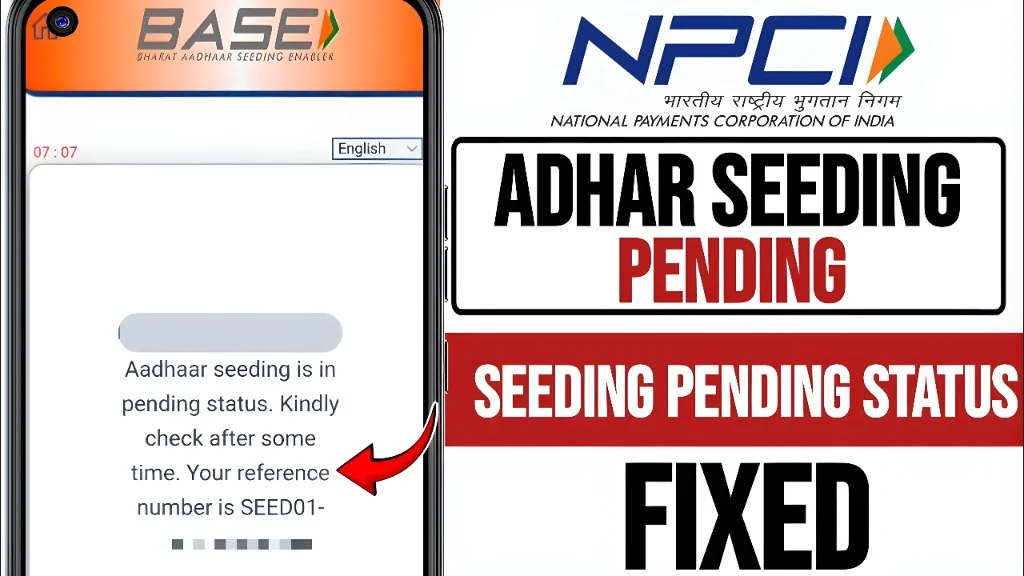
Aadhaar seeding pending status means your Aadhaar-to-bank mapping request is still under process. It does not always mean your request failed. It simply means the final confirmation is not active yet. Many people get confused because they think Aadhaar linking and Aadhaar seeding are the same thing. They are connected, but they are not always the same.
Aadhaar linking means your Aadhaar number is linked with your bank account in the bank’s record. Aadhaar seeding means your Aadhaar-linked bank account is mapped in the NPCI system so that DBT benefits can reach that account. So, your bank may say “Aadhaar linked,” but DBT status may still show pending, inactive, or not mapped. This is why many users face problems even after submitting Aadhaar details to the bank.
Think of it like this. Your bank record is one room. The NPCI mapper is another room. Your Aadhaar must be updated in the right room for DBT payments to work smoothly.
Why Aadhaar Seeding Matters for DBT Payments
Aadhaar seeding is important because many government benefits are sent through Direct Benefit Transfer, also called DBT. These benefits may include subsidies, pensions, scholarships, welfare payments, and other scheme amounts. When your Aadhaar is seeded correctly, the payment system knows which bank account should receive your benefit. This helps reduce mistakes and sends money directly to the right beneficiary.
But if the seeding is pending, your payment may not arrive on time. In some cases, the payment may fail. In other cases, it may go to the last active bank account linked in the NPCI mapper. This is why checking the status is very important. Do not wait until your subsidy or benefit is delayed. A quick status check can save you from stress later.
Aadhaar Linking vs Aadhaar Seeding: Simple Difference
Aadhaar linking means your Aadhaar number is connected to your bank account in the bank’s internal system. This may be used for KYC, identity verification, and account records. Aadhaar seeding means your Aadhaar number is mapped with a bank account in the NPCI mapper for DBT payments. This mapping helps government benefit payments reach the selected bank account. Here is the easy way to understand it:
So, when someone says their Aadhaar is already linked but subsidy is not coming, the issue may be with NPCI mapping or DBT seeding status.
Common Reasons Why Aadhaar Seeding Is Pending
There can be many reasons behind a pending Aadhaar seeding status. The most common reason is that the bank has not completed the mapper update yet. Another common reason is incomplete details in the consent form. If your account number, Aadhaar number, mobile number, or signature does not match bank records, the request may not move forward.
Sometimes the issue happens because your Aadhaar is linked to another bank account. If you recently changed banks, the old account may still be active in the mapper. In some cases, your bank account may be inactive, frozen, closed, dormant, or under KYC update. If the bank account itself has an issue, DBT seeding may stay pending. A name mismatch can also create trouble.
For example, your Aadhaar may show one spelling, while your bank account shows another spelling. Small spelling differences may not always cause failure, but bigger mismatches can delay processing. The pending status may also appear if the bank has linked Aadhaar in its own system but has not pushed the correct update to the NPCI mapper. This is one of the most common causes.
What to Do First When Status Shows Pending
Do not panic. Pending does not always mean rejected.
This wording is important. If you only ask, “Is my Aadhaar linked?” the bank may only check its internal record. You need to ask about NPCI mapper or DBT seeding.
How to Check Aadhaar Bank Seeding Status Online
You can check Aadhaar-bank linking status through the official Aadhaar service. This status is based on NPCI data, so it helps you know whether your Aadhaar is mapped with a bank account. Usually, you need your Aadhaar number, registered mobile number, captcha, and OTP. The OTP goes to your Aadhaar-registered mobile number.
After verification, the page may show whether your Aadhaar is linked or not linked with a bank account. It may also show the bank name where your Aadhaar is mapped. If it shows pending, inactive, not seeded, or not mapped, contact the bank. The bank is the right place to correct the seeding request because banks submit the mapper update.
You can also check through the NPCI BASE platform. BASE is made for Aadhaar seeding, de-seeding, checking status, checking history, and moving Aadhaar mapping from one account or bank to another where the service is available.
How to Fix Aadhaar Seeding Is in Pending Status
To fix the issue, start with the bank account where you want to receive DBT. Visit the branch or use your bank’s digital service if available. Ask for the Aadhaar seeding or NPCI mapping consent form. Fill it carefully. Write your account number, Aadhaar number, mobile number, name, and other details exactly as required. Submit a copy of Aadhaar if the bank asks for it. Carry your bank passbook or account proof as well. Make sure your signature matches the bank record.
After submitting the form, ask for an acknowledgement. This is very important. If the issue stays pending, this acknowledgement helps you raise a complaint later. Then ask the bank to confirm that the request is not just updated in the bank account, but also sent for NPCI mapper update. This one step can solve many problems. Many users face delays because the bank account shows Aadhaar linked, but the NPCI mapper is not updated.
Documents You May Need
The exact documents can depend on the bank, but most banks may ask for basic proof.
Do not give your original Aadhaar to unknown people. Share documents only with your official bank branch, official bank app, or trusted banking channels.
How Long Does Aadhaar Seeding Take?
There is no single fixed time that works for every bank and every case. Some requests may update quickly, while others may take longer because the bank needs to verify details and process the mapper update. The best thing is to ask your bank for the expected time. Also ask when you should check the status again.
If the status does not change after the bank’s given time, visit the branch again with your acknowledgement slip. Do not submit multiple requests again and again without checking the previous request. This can create confusion, especially if you have more than one bank account.
What If Aadhaar Is Linked but DBT Is Not Coming?
This is a common problem. Your Aadhaar may be linked with your bank, but DBT may still not come because the NPCI mapper status is not active. First, check the Aadhaar-bank linking status. Then check whether the correct bank name is showing. If the wrong bank is showing, visit the bank where you want to receive DBT. Submit a request to move Aadhaar mapping to that bank account. If no bank is showing, submit a fresh seeding request.
If the correct bank is showing but DBT is still not coming, check the scheme portal. Sometimes the issue is not with Aadhaar seeding. It may be with your scheme application, eligibility, payment batch, rejected transaction, or wrong beneficiary details. For example, scholarship payments, pension payments, and LPG subsidy may have separate scheme-side checks. Aadhaar seeding is only one part of the process.
What If Aadhaar Is Seeded to the Wrong Bank?
If your Aadhaar is seeded to the wrong bank, your DBT benefit may go to that account. This often happens when you opened a new account and gave Aadhaar consent there. To fix it, choose the bank account where you want DBT payments. Visit that bank and submit a fresh Aadhaar seeding or mapper movement request.
Ask the bank to move the Aadhaar mapping from the old bank to the new bank. This is important because only one account is usually active for DBT at a time. After submitting the request, check the status again after the bank’s processing time. Make sure the new bank name appears in the mapper status.
What If Your Bank Says Aadhaar Is Already Linked?
This is where you need to ask the right question. Do not only ask, “Is my Aadhaar linked?” Instead, ask:
These questions help the bank understand the real issue. Sometimes the branch staff may only check the bank’s core banking system. That does not always prove that DBT mapper status is active. Ask politely, but be clear. Your goal is not only Aadhaar linking. Your goal is active DBT seeding.
What If Name Mismatch Is Causing Pending Status?
Name mismatch can delay or block many financial services. If your Aadhaar name and bank account name are very different, the bank may ask you to update one of them. Start by checking your Aadhaar details. Then check your bank passbook or bank profile.
If Aadhaar has the wrong spelling, update Aadhaar through the official Aadhaar update process. If your bank record has the wrong spelling, ask the bank to correct it with proper documents. Do not guess which one to change. Compare both records first. Also check date of birth, gender, and mobile number where needed. Some scheme portals may use these details to match beneficiary records.
What If Mobile Number Is Not Linked with Aadhaar?
Many online status checks need OTP. If your mobile number is not linked with Aadhaar, you may not be able to check status online. In that case, visit an Aadhaar update centre to update your mobile number. You can also check with your bank branch for offline support.
Once your mobile number is updated, online services become easier. You can check Aadhaar services, receive OTP, and track important updates more smoothly. Keep your mobile number active. Do not use someone else’s mobile number for important bank and Aadhaar work.
Can You Receive DBT in More Than One Bank Account?
Usually, DBT payments go to one active Aadhaar-seeded bank account. If you have many bank accounts, the system does not send the same DBT payment to all accounts. The active account is usually the one mapped in NPCI for DBT. If you seed Aadhaar with a new bank and the request is completed, future DBT payments may go to the new mapped account.
This is why you should be careful when giving Aadhaar consent to banks. If you do not want to change your DBT account, do not submit mapper movement consent by mistake. Always read the form before signing. Choose the correct option for receiving DBT benefits.
Aadhaar Seeding Pending for Scholarship
If your scholarship payment is delayed and Aadhaar seeding is pending, check both sides. First, check the Aadhaar-bank mapping status. Make sure your bank account is active for DBT. Second, check your scholarship portal. The application may be under verification, approved, rejected, or waiting for payment release.
Third, confirm your name, Aadhaar number, bank account number, IFSC, and institution details. Scholarship portals may reject payment if details do not match. If the scholarship portal says payment failed due to bank mapping, visit your bank and submit the seeding request again.
Keep proof of your scholarship application and bank acknowledgement. This helps if you need to contact the scholarship helpdesk.
Aadhaar Seeding Pending for LPG Subsidy
For LPG subsidy, Aadhaar seeding status matters because subsidy payments are usually sent to the Aadhaar-linked DBT bank account. If the status is pending, first check which bank is mapped. Then check your LPG consumer portal or contact your gas agency. If your payment failed earlier, the subsidy may need to be reprocessed by the service provider after your bank mapping becomes active.
Do not only update your Aadhaar with the gas agency. Make sure your bank account is also correctly seeded for DBT. If you changed your bank recently, the subsidy may still be connected to the old mapped bank until the new mapping becomes active.
Aadhaar Seeding Pending for Pension
Pension payments can be very important for families, so pending status should be fixed quickly. Check if your Aadhaar is mapped with the bank where you receive pension. Also check whether the account is active and not dormant. If the pension department or portal says Aadhaar seeding is pending, visit the bank first.
Submit the consent form and ask them to update NPCI mapping. Then contact the pension office or scheme helpdesk if the bank status becomes active but payment is still not released. Sometimes pension delay is due to life certificate, eligibility review, or scheme-level verification. So check both bank and scheme status.
Aadhaar Seeding Pending for PM Kisan or Other Schemes
For PM Kisan and other government schemes, Aadhaar seeding may be one of the payment conditions. If the scheme portal shows bank or Aadhaar related error, check your Aadhaar-bank mapping status first. Then check your scheme record. Your Aadhaar number, name, land details, bank account, and other details may need correction depending on the scheme.
If your bank mapping is pending, submit the seeding request at your bank. If your scheme record is wrong, correct it through the scheme portal or local office. Do not assume every payment problem is from Aadhaar seeding. Many scheme payments depend on several checks.
Common Mistakes to Avoid
Safe Tips Before Submitting Aadhaar Seeding Request
Step-by-Step Fix Plan
Here is a simple plan you can follow.
This plan is simple, but it works because it focuses on the real point: mapper update.
When Should You Visit the Bank Branch?
Visit the bank branch if online status keeps showing pending, inactive, or not mapped. You should also visit the branch if your Aadhaar is mapped to the wrong bank, your account is dormant, your name does not match, or your mobile number is not updated.
A branch visit is also useful when you need a stamped acknowledgement. Online requests are easy, but a physical acknowledgement can help during complaints. When you visit, carry all documents. Do not go with only Aadhaar number in your phone. Banks may ask for printed or original proof.
Is Pending Status the Same as Rejected?
No, pending and rejected are not the same. Pending means the request is still not completed or the final status is not active. Rejected means the request failed or was not accepted due to some issue.
However, if the status stays pending for too long, treat it like a problem and follow up with the bank. Sometimes a failed request may not be clearly visible to the customer. Ask the bank to check whether any mapper response file or update response shows failure. This helps them find the real reason.
Can Aadhaar Seeding Pending Affect Payments?
Yes, it can affect payments linked to DBT. If the system cannot find an active mapped bank account, payment may be delayed or fail. But not every payment delay is due to Aadhaar seeding. Sometimes the scheme has not released the payment yet. Sometimes your application is still under review. Sometimes bank details are wrong in the scheme portal. So, check both places: Aadhaar-bank mapper status and scheme payment status. This gives you a complete picture and saves time.
Important Privacy and Safety Advice
Aadhaar is sensitive personal information. Handle it carefully.
If someone asks for OTP, card PIN, UPI PIN, or internet banking password, stop immediately. That is not normal verification.
Quick Troubleshooting Checklist
If your status is pending, check these points:
FAQs
Final Thoughts
If aadhaar seeding is in pending status, do not worry, but do not ignore it either. Pending status usually means the bank or mapper update is not fully active yet. The best solution is to check your status, confirm the correct bank account, submit the consent form, and ask the bank to update the NPCI mapper for DBT.
Remember, Aadhaar linking in the bank record is not always enough. For DBT payments, the NPCI mapper status is the key point. Keep your documents ready, take acknowledgement, and follow up with the bank if the status does not change. A little action now can help you avoid delayed subsidies, scholarships, pensions, and other government benefits later.