
Aadhaar Card Status Check & Update 2026: A Complete Guide
Aadhaar UIDAI, a 12-digit unique identification number issued by the Unique Identification Authority of India (UIDAI), serves as a vital document for various government, banking, and financial services. Tracking your Aadhaar card status is essential to ensure that your application, update, or PVC card request is processed and delivered on time. This detailed guide will explain how to check the status of your Aadhaar application, the different types of Aadhaar status, and the methods provided by UIDAI to track it.
Aadhaar Enrolment & Update Status
Check your Aadhaar enrolment status and track updates.
Enrolment & Update Status
Track your Aadhaar enrolment or update progress in real-time.
Types of Aadhaar Card Status You Can Check
Before you begin tracking, it’s important to understand the different types of Aadhaar card status you might need to check:
Aadhaar Enrolment Status
When you first enrol for Aadhaar at an Aadhaar Seva Kendra (ASK) or Permanent Enrolment Centre (PEC), you receive a 28-digit Enrolment ID (EID). This number is essential for tracking the progress of your Aadhaar application. You can check whether your Aadhaar has been generated, is still under processing, or has been delayed.
Aadhaar Update/Correction Status
If you need to make changes to your Aadhaar details, such as your name, address, mobile number, or biometric information, you can submit an update request. When you submit the request, you are provided with a 14-digit Update Request Number (URN). This number helps you track whether the update request has been successfully processed or is still under review.
Aadhaar PVC Card Status
The PVC Aadhaar card is a durable, wallet-sized version of the original Aadhaar card. When you apply for a PVC card, you will receive a Service Request Number (SRN), which you can use to track the progress of your PVC card request. The SRN allows you to monitor whether the card is being printed, dispatched, or delivered.
Aadhaar Complaint Status
If you face any issues, such as delays in Aadhaar updates, rejection of applications, or other concerns, UIDAI provides a grievance redressal mechanism. You will receive a complaint reference number when you file a complaint, which you can track until the issue is resolved.
Aadhaar Validity Check
To ensure that your Aadhaar number is genuine and active, UIDAI provides a validity check tool. This service is useful for banks, employers, and other institutions that require confirmation of your Aadhaar’s authenticity. It helps avoid fraud and ensures the legitimacy of the Aadhaar number.
Methods to Check Aadhaar Status
UIDAI has made the process of tracking Aadhaar status simple, with various online and offline methods available. Here’s a detailed explanation of each method:
UIDAI Website (myAadhaar Portal)
The official UIDAI website is the most reliable platform for tracking your Aadhaar status. The process is straightforward:
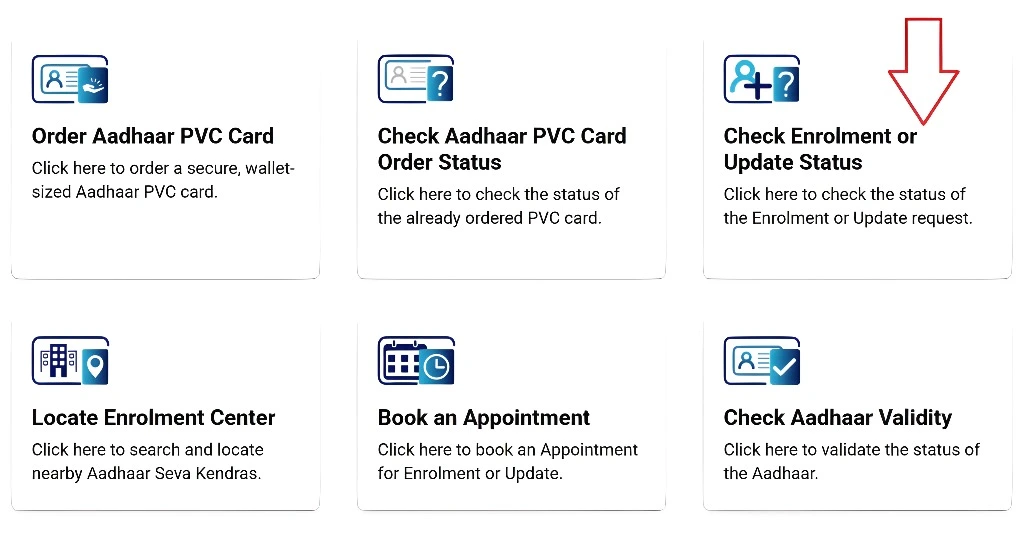
This method provides real-time status updates, and you will receive an SMS or email notification once your Aadhaar is ready.
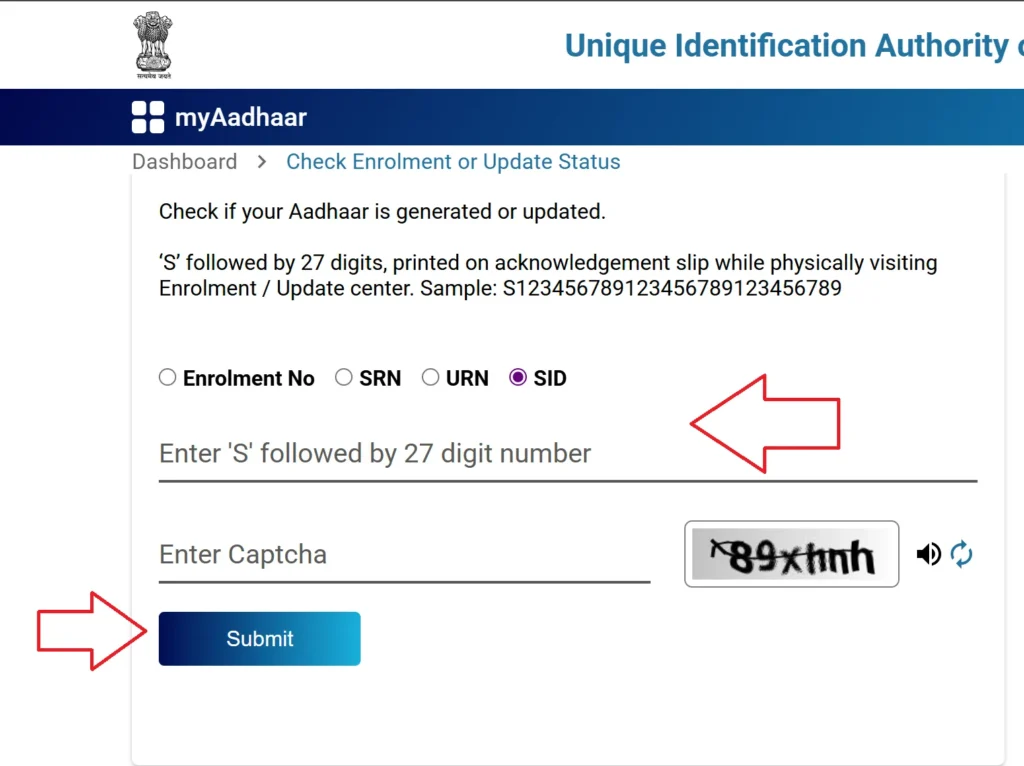
mAadhaar App
For those who prefer mobile solutions, the mAadhaar app is a convenient option. You can download the app from the Google Play Store or Apple App Store.
UMANG App
The UMANG (Unified Mobile Application for New-age Governance) app integrates various government services, including Aadhaar tracking. It allows you to check the Aadhaar status from your mobile device:
Toll-Free Helpline (1947)
For residents who do not have internet access or prefer phone-based support, you can call UIDAI’s toll-free helpline at 1947. This IVR service allows you to check the status of your Aadhaar application or update.
India Post Tracking (For PVC Aadhaar)
After applying for a PVC Aadhaar card, you will receive a tracking number for delivery. UIDAI dispatches the PVC card via India Post, and you can use the consignment number to track its delivery.
What You Need to Check Aadhaar Status
Before you check your Aadhaar card status online or via other methods, ensure you have the following details:
Common Issues and Solutions
While tracking Aadhaar card status, you might encounter some issues. Here are some common problems and their solutions:
1. OTP Not Received:
Ensure your mobile number is registered with UIDAI.
Check that your mobile number has a stable network connection.
If you still don’t receive the OTP, wait for a few minutes and try again.
2. Invalid EID/URN/SRN:
Double-check the digits you’ve entered. Even a small error can lead to an invalid status check.
Verify that you are using the correct EID/URN/SRN for the type of status you are checking.
3. Status Pending Too Long:
Sometimes the verification process takes longer than expected. If your status remains pending for more than 90 days, consider visiting an Aadhaar Seva Kendra for further assistance.
4. Update Request Rejected:
If your Aadhaar update request is rejected, it is typically due to incorrect or insufficient documents. You will need to resubmit your request with valid documents either online or at an Aadhaar Seva Kendra.
5. PVC Card Not Delivered:
If your PVC Aadhaar card has not been delivered, use the tracking number to check its status via India Post.
How Can I Check My Aadhaar Card Status After Enrollment?
To check your Aadhaar card status after enrollment, you need your Enrolment ID (EID). Follow these steps:
You can track the progress of your Aadhaar card application in just a few minutes using the EID given on your acknowledgment slip.
What Does “Under Process” Mean for My Aadhaar Status?
When your Aadhaar card status shows “Under Process”, it means that the UIDAI is still verifying the details submitted during the enrollment. This can take time due to a number of reasons such as high volume, verification issues, or other delays. “Under Process” typically lasts from 10 to 90 days depending on various factors like biometric verification and document verification. It’s a normal part of the processing.
How Long Does It Take to Generate an Aadhaar Card After Enrollment?
Aadhaar generation can take 10 to 90 days after you apply at an Aadhaar Seva Kendra (ASK). The actual time depends on the volume of applications and the speed of biometric verification. Most Aadhaar card applications are processed within 90 days. You will be notified once the card is ready, and you can check the status using your EID.
Can I Check Aadhaar Update Status Without a Registered Mobile Number?
While having a registered mobile number simplifies the Aadhaar status check process (via OTP), you can still check your status without it. You can use your Enrolment ID (EID) or Update Request Number (URN) to access the information on the UIDAI website. Yes, you can check status without a registered mobile number using EID or URN on the UIDAI website. However, for OTP-based services, you will need a registered number.
What Does It Mean If My Aadhaar card Status Shows “Rejected”?
If your Aadhaar status shows “Rejected,” it usually means that there was an issue with your application. This could be due to incorrect details, mismatched documents, or failure in biometric verification. To resolve this, you need to reapply or correct your documents at the Aadhaar center and submit the correct details for approval.
How Can I Check the Status of My Aadhaar PVC Card?
To track your PVC Aadhaar card status, you will need the Service Request Number (SRN). Here’s how to track it:
Why Is My Aadhaar Status Showing “Generated” But I Still Can’t Download My Card?
If the status shows “Generated”, but you can’t download your Aadhaar, there might be a technical glitch or a delay in the system updating your file. In such cases, you can wait a few hours and try again. If the issue persists, check for system maintenance or try downloading via the mAadhaar app or UMANG app.
What Should I Do If My Aadhaar Update Status is Stuck for Over 30 Days?
If your Aadhaar update status remains stuck beyond the usual 10-30 days, it’s time to follow up. You can:
How Do I Check the Validity of My Aadhaar Card?
To check if your Aadhaar is valid and active, follow these steps:
This service ensures that only genuine and active Aadhaar cards are accepted for official use, helping prevent misuse.
Can I Track My Aadhaar Card Status Using the Toll-Free Number?
Yes, you can track your Aadhaar status by calling the UIDAI toll-free helpline (1947). Here’s how:
For users without internet access, this toll-free number provides a convenient way to track status directly.
FAQs
Final Thoughts
Tracking the status of your Aadhaar application or update is now simpler than ever, thanks to UIDAI’s user-friendly platforms like the official website, mAadhaar app, UMANG app, and toll-free helpline. These tools allow you to stay updated on the progress of your Aadhaar and ensure that any issues are quickly addressed. Whether you’re applying for a new Aadhaar, requesting updates, or tracking your PVC card status, these methods provide a fast and secure way to keep tabs on your Aadhaar.
Always ensure your details are accurate and your mobile number is registered to receive real-time updates. With these tools at your disposal, tracking your Aadhaar status has never been easier.