UIDAI Appointment: Book Aadhaar Seva Kendra Online Easily
In a world where identity verification and digital authentication have become integral to daily life, Aadhaar UIDAI stands at the core of India’s digital identity ecosystem. Offered by the Unique Identification Authority of India (UIDAI), Aadhaar is a 12‑digit unique identification number that securely links your demographic and biometric information. Over the years, Aadhaar has evolved from a simple identity document to an essential requirement for banking, government schemes, telecommunications, taxation, and more.
Understanding this, the government introduced an online appointment system that allows applicants to book time slots for Aadhaar services at designated centres known as Aadhaar Seva Kendras (ASKs). This guide explains everything you need to know about booking UIDAI appointments, available services, fees, tips, and the best ways to make your visit to an Aadhaar centre smooth and efficient.
Understanding Aadhaar and its Importance
At its core, Aadhaar is a biometric and demographic identity system designed to provide a unique identity to each resident of India. Aadhaar collects details such as your name, address, date of birth, photograph, fingerprints, and iris scans, all of which are stored securely in UIDAI’s database.
The purpose of Aadhaar is to establish a single proof of identity that is accepted across the country and linked to multiple government and private services. Over time, Aadhaar has become indispensable when it comes to financial services, social security schemes, tax filings, mobile connections, bank accounts, pension disbursements, and much more.
Because it plays such a critical role in everyday life, it’s important that your Aadhaar details are accurate and up‑to‑date. Whether you are enrolling for the first time, changing your address after relocation, correcting a spelling mistake in your name, or updating your biometric data, the Aadhaar system provides methods to handle these requirements efficiently.
Traditionally, people visiting Aadhaar centres had to stand in long queues and wait for their turn. To address these issues, UIDAI implemented a structured appointment booking system that reduces waiting time, improves convenience, and makes service delivery more organized and user‑friendly.
What Is the UIDAI Appointment System?
The UIDAI appointment system is an online service that allows residents to reserve a slot at an Aadhaar Seva Kendra. Instead of showing up and waiting indefinitely, you can plan your visit in advance, choose a date and time that works best, and receive guaranteed attention when you arrive. This system is designed to improve both user experience and administrative efficiency.
The appointment platform minimizes overcrowding, enhances crowd management, and brings transparency into the process by confirming your booking with details such as date, time, and location. Booking an appointment doesn’t just save time — it also allows you to prepare documents ahead, verify the type of service you require, and plan accordingly so that your requirements are fulfilled without delay.
Aadhaar Seva Kendra (ASK): Your Local Aadhaar Service Centre
An Aadhaar Seva Kendra (ASK) is an official facility set up by UIDAI to provide Aadhaar‑related services in a structured and professional environment. These centres are equipped with trained staff, biometric devices, document verification systems, and help desks designed to assist residents with their Aadhaar requirements.
ASKs play a vital role in offering offline Aadhaar services, which include everything from first‑time enrolment to demographic updates, biometric corrections, document verification support, issuance of Aadhaar cards, updates, and enrolment status checks. Booking your appointment in advance is optional but highly recommended to avoid wait times, especially during peak hours when many applicants are likely to visit without prior scheduling.
Comprehensive Services Available at Aadhaar Seva Kendras
Understanding the full range of services available at ASK helps you choose the right appointment type and prepare the necessary documents beforehand.
1. Aadhaar Enrolment
If you or your family members have never enrolled for Aadhaar, the enrolment service is the starting point. Aadhaar enrolment is available for:
During the enrolment process, trained operators capture your photograph, fingerprints, and iris scans, and record your basic details such as name, date of birth, gender, address, and contact information. You need to provide valid identity proof and address documents to complete this process. Once enrolment is complete, you receive a temporary acknowledgement number, which can be used to check the status of your Aadhaar.
2. Updating Demographic Details
Demographic updates refer to changes in your Aadhaar information that do not include biometric data. These details can change due to life events such as marriage, relocation, or updated documentation. Common demographic updates include:
These updates are important because incorrect information can lead to authentication failures or delays when using Aadhaar for services.
3. Biometric Updates
Biometric details like fingerprints, iris scans, and photographs may need updating due to changes in physical features, wear and tear of fingerprints, or initial errors during enrolment. Children who enrolled at a young age are often asked to update their biometrics when they reach certain age thresholds, as their biometric characteristics evolve as they grow. Biometric updates ensure that authentication systems recognize you accurately, preventing rejections during services that depend on biometric verification.
4. Document Verification Support
One of the primary challenges for many applicants is knowing what documents to carry for their specific Aadhaar service. ASK staff can help verify whether your documents are valid for the requested update or enrolment. This verification ensures that your application doesn’t get rejected due to improper documentation, saving you time and preventing repeated visits.
5. Aadhaar Card Reissue & PVC Card Printing
If your Aadhaar card is lost, damaged, or you simply want a more durable version, you can request a reprint of your Aadhaar in PVC format. The PVC Aadhaar card is water‑resistant, more robust, and easier to carry.Reissuing or printing your Aadhaar card can be done at the ASK with an appointment, ensuring the process is smooth and quick.
6. Application Status Assistance
At any point, you might want to check the status of your Aadhaar enrolment or update request. ASK staff can help you track your application using reference numbers provided during the initial submission. Whether you want to confirm whether your updated details have been processed or check how much longer it might take, a service appointment can assist you with that.
Step‑by‑Step Guide to Book Your UIDAI Appointment Online
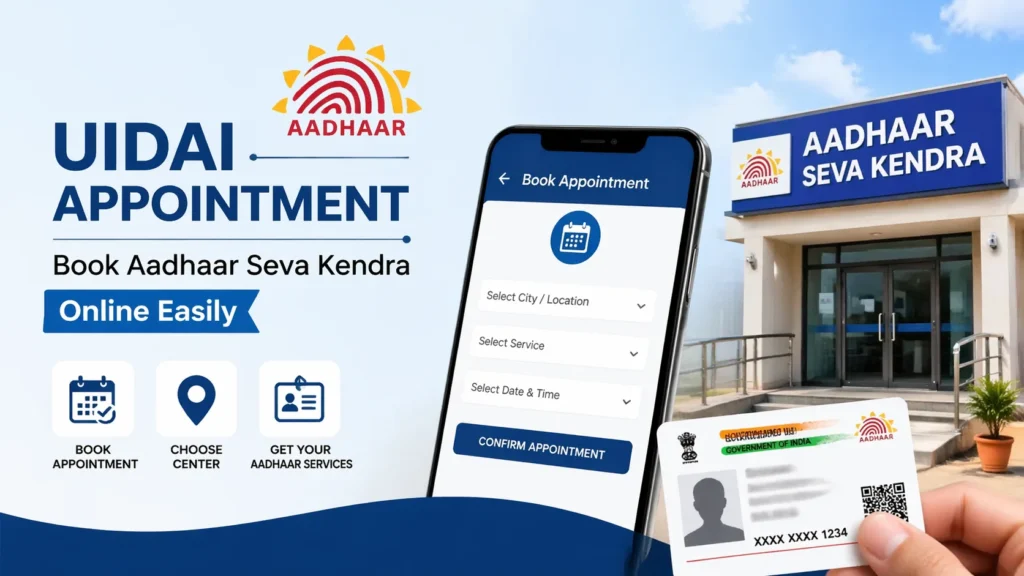
Booking an appointment online is straightforward and designed for ease of use. Follow these steps to secure your Aadhaar service visit:
Step 1: Access the Appointment Portal
Visit the UIDAI appointment booking section on the official portal. Once there, look for the option that says “Book an Appointment” under the Aadhaar services category.
Step 2: Select Your State and City
You’ll be asked to provide your location information so that the system shows only relevant centres near you. Select your state and city or district.
Step 3: Choose the Type of Service
The appointment system gives you options such as:
Choose the service that best matches your requirement.
Step 4: Enter Your Mobile Number
You will need to verify your identity by providing a mobile number. An OTP (One‑Time Password) is sent to your phone to authenticate your request.
Step 5: Fill in Required Aadhaar Details
For services that involve updates or corrections, you must provide your Aadhaar number and other requested details exactly as they appear on your Aadhaar card. For new enrolments, the system may collect basic information to prepare for the appointment.
Step 6: Choose Your Preferred Aadhaar Seva Kendra
After verification, you will see a list of available centres in your city or area. These centres are equipped to handle the type of service you have chosen. Select the most convenient location.
Step 7: Select Your Date and Time Slot
Based on availability, the system displays open booking slots with dates and times. Choose a slot that works best for you.
Step 8: Review Your Information
Before final confirmation, the appointment system lets you review all the details you have entered. Take a moment to verify information such as your name, Aadhaar number, date of birth, and contact number. Correcting inaccuracies later can be time‑consuming, so this step helps prevent errors.
Step 9: Confirm and Download Appointment Slip
After reviewing your submission, confirm your booking. You’ll receive a confirmation and appointment slip, which should be saved and printed. The appointment slip contains vital information like your appointment date, time, centre name, and reference number. Bringing this slip with you ensures verification at the ASK desk.
Managing and Modifying Your UIDAI Appointment
What if you need to change your booking? The UIDAI system provides features to:
Reschedule Appointment
If your plans change, you can access the “Manage Appointment” section, provide your mobile number and OTP, and select a new date and time. Rescheduling helps you adapt your visit without having to cancel and rebook from scratch.
Cancel Appointment
In case you no longer require the scheduled appointment, the cancellation feature allows you to free up your slot for other residents and avoid unnecessary bookings.
View Appointment Details
You can revisit your appointment information anytime by entering your registered mobile number and OTP. This is helpful if you forget your appointment slip or need to reconfirm details before your visit.
Understanding Aadhaar Fees and Charges
UIDAI has stipulated fees for certain Aadhaar services. These fees are nominal and structured in a way to make essential updates affordable to residents. Here’s an overview of typical fee categories:
| Service Category | Applicable Charge |
| Aadhaar Enrolment | Free |
| Demographic Update (Separate) | ₹75 |
| Biometric Update | ₹125 |
| Combined Demographic + Biometric Update | Free |
| Document Assistance at Centre | ₹75 |
| Aadhaar Card Printing (PVC) | ₹30‑₹40 (approx.) |
Fees may vary based on government policy changes, so it’s a good idea to double‑check applicable charges when booking your appointment. It’s also worth noting that certain updates done through the online portal (such as demographic updates on MyAadhaar) may be free up to a specific deadline announced by UIDAI.
Documents Required For Aadhaar UIDAI Appointment
Bringing the right documents is crucial for a smooth and successful visit. Depending on the type of service you selected, you may need to carry:
Identity Proof (Any One)
Proof of Address
Proof of Date of Birth
Mobile Number (Registered)
Your mobile phone must be active and in your possession because OTP verification is needed both during online appointment booking and on‑site confirmation. Bring photocopies as well as originals for verification. Staff may take copies and retain them for official verification procedures.
Best Tips to Ensure a Smooth Aadhaar Appointment Experience
Even when you follow all procedures correctly, a few practical tips can make the entire process faster and more successful:
1. Plan Well Ahead: Avoid last‑minute bookings. Book your slot at least a few days before you want to visit to get the best available time. Later appointments may fill up quickly, especially during peak months.
2. Reach the ASK Centre Early: Arrive at least 10‑15 minutes before your scheduled slot. This gives you time to complete any initial verification steps. Late arrival might result in your slot being rescheduled if the centre is busy.
3. Double‑Check Your Details: Review the information you entered on the appointment system before final confirmation. Mistaken spelling, wrong Aadhaar digits, or incorrect contact numbers can cause delays or rejection.
4. Keep Your Mobile Active: Your phone number is used for OTP verification and receiving updates, so ensure it’s active, charged, and within reach.
5. Maintain Neat Document Organization: Place your documents in a folder arranged by category (ID proof, address proof, DoB proof, originals, copies). This avoids confusion during verification.
6. Save Your Reference Numbers: After completing the process, you will receive a reference number for status tracking. Save it safely so you can follow up on your request later.
7. Dress Appropriately and Professionally: While this may seem minor, dressing comfortably and neatly helps with verification and ensures fewer hassles at the service counter.
FAQs
Final Thoughts
Aadhaar is more than just an identity number — it is a gateway to numerous services that touch every aspect of modern life. Whether you need to enroll for the first time, update your details, correct biometric information, print a new card, or check your application status, the UIDAI appointment system makes the entire process structured, efficient, and user‑centric. The key benefits of the appointment system include shorter wait times, better crowd management, clarity in service delivery, and enhanced user convenience.
With a thorough understanding of the procedures, preparations, required documents, fees, and best practices outlined in this guide, you are now equipped to navigate Aadhaar services confidently and effectively. Book your appointment, prepare your documents, arrive on time, and let the centre staff guide you through the rest with minimal stress and maximum clarity. Your Aadhaar journey should be smooth — and with the right preparation and this detailed guide, it will be.