Your Aadhaar Enrollment Is Under Process – Easy Update Guide
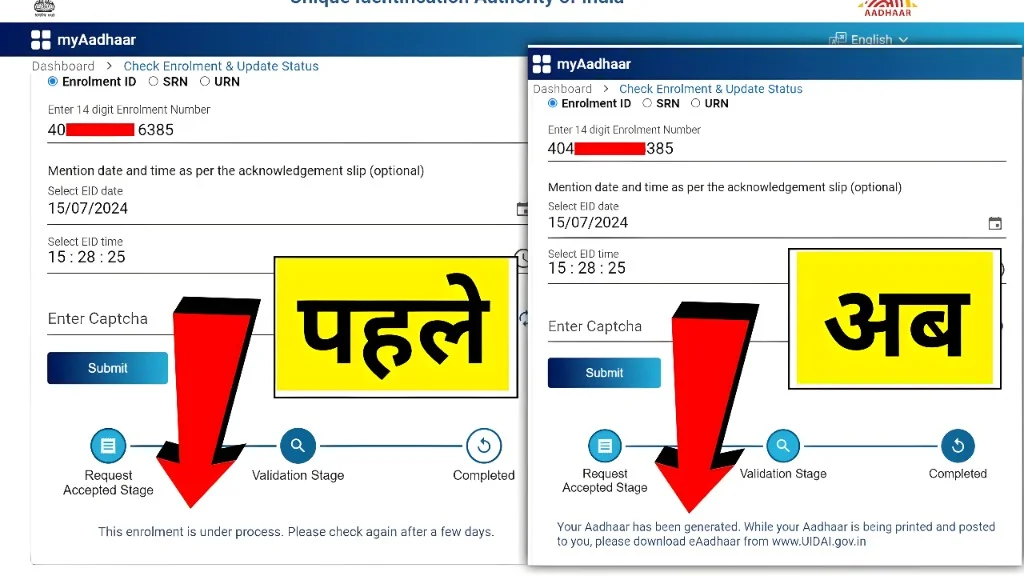
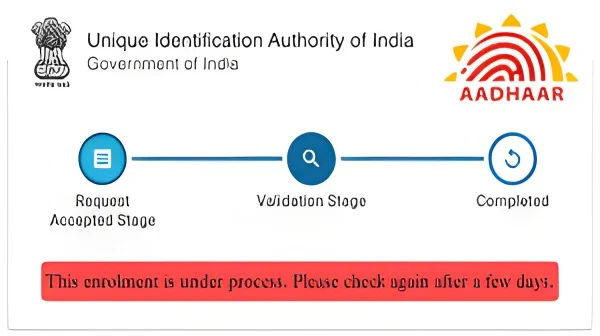
If you are seeing “Your Aadhaar enrollment is under process. Please check after few days UAS-BPR-SSA-INF-107”, it means your Aadhaar enrolment or update request is still under verification. You usually do not need to do anything immediately. Wait for a few days and check your status again on the official Aadhaar UIDAI portal. However, if the same message continues for many weeks or more than 90 days, you should contact the UIDAI helpline 1947 or visit your nearest Aadhaar Seva Kendra for assistance.
What Does “Your Aadhaar Enrollment Is Under Process” Mean?
This message means UIDAI has received your Aadhaar enrolment or update request, but it has not been completed yet. Your details may still be going through checks such as:
Aadhaar is an important identity document, so UIDAI does not generate or update it instantly in every case. The system checks your details before approving the request. So, when the status says under process, it simply means the final result is pending. It does not always mean there is a problem. It is often a normal part of the Aadhaar process.
What Is UAS-BPR-SSA-INF-107?
The code UAS-BPR-SSA-INF-107 appears with the message: “Your Aadhaar enrollment is under process. Please check after few days.” For users, this code is mostly an internal status or information code. It is not something you need to fix manually. The important part of the message is this: Your Aadhaar request is still being processed.
The code itself does not clearly explain the exact reason for the delay. It simply appears along with the under-process message. So, do not panic after seeing this code. Focus on checking your status correctly and waiting for the normal processing period.
Is UAS-BPR-SSA-INF-107 an Error?
In most cases, no. It is not a serious error. It is more like an information message. It tells you that your Aadhaar request is still pending. Many people think this code means rejection, but that is not always true. If your Aadhaar is rejected, the status normally shows rejected or unsuccessful. If it says under process, that usually means the request is still active. However, if the same message stays for a very long time, then you may need to take action.
Why Does This Message Appear?
This message can appear for many reasons. Some are normal. Some may need action later. Here are the most common reasons.
1. Your Aadhaar Request Is Still in Normal Processing
This is the most common reason. After you submit Aadhaar enrolment or update details, the request does not get approved immediately. UIDAI has to check the information. If you recently enrolled or updated your Aadhaar, this message is normal.
Solution:
Wait for a few days and check again.
Do not submit another request immediately. Reapplying too soon may create confusion or duplicate processing.
2. Aadhaar Verification Is Taking Time
Aadhaar verification includes checking your name, date of birth, address, gender, photo, fingerprints, iris scan, and submitted documents. Sometimes the system takes extra time because the data needs more checks. This can happen if:
Solution:
Wait for the normal time period. If it does not update after many days, contact UIDAI.
3. High Number of Aadhaar Requests
Sometimes UIDAI receives a large number of enrolment and update requests. During such times, processing may slow down. This is common after government deadlines, school admission periods, bank account verification drives, PAN-Aadhaar linking updates, or local Aadhaar camps.
Solution:
Keep checking your status every few days. If the status does not change for a long time, call 1947.
4. Biometric Quality Issue
Aadhaar uses biometric details like fingerprints, iris scan, and photo. If your fingerprint or iris scan was not captured properly, your request may take longer. This is more common in:
Solution:
Wait for the status result. If rejected, visit an Aadhaar centre and re-enrol or update biometrics carefully. When visiting again, make sure your fingers are clean and dry. Avoid applying oil or cream before fingerprint scanning.
5. Document Verification Delay
If your Aadhaar update is related to name, address, date of birth, or other demographic details, UIDAI may verify your supporting document. Delay can happen if:
Solution:
If the request is still under process, wait. If it gets rejected, submit a fresh request with a clear and valid document. Use documents from the official accepted document list only.
6. Name Mismatch
A name mismatch is a very common reason for Aadhaar update delays. For example:
Even small differences can sometimes create problems.
Solution:
Use a document where your name matches exactly with the name you want on Aadhaar. Avoid short forms, spelling differences, and initials unless they are accepted as per rules.
7. Date of Birth Mismatch
Date of birth updates can take time if the date on your submitted document does not match the date you entered. For example:
This mismatch can delay or reject the request.
Solution:
Check your document before submitting. Make sure the date of birth is clear and exactly correct.
8. Address Format Issue
Sometimes address updates stay under process because the address is incomplete or unclear. Common address problems include:
Solution:
Enter your address exactly as it appears on your valid proof of address. Make sure the PIN code is correct. Also, upload a clear document.
9. Mobile Number Update Delay
If you updated your mobile number at an Aadhaar centre, the status may show under process for some time. Mobile number updates cannot usually be completed only online. They require biometric verification at an Aadhaar centre.
Solution:
Wait for processing. Once updated, you should be able to receive OTPs on your new mobile number. If it does not update after many days, call UIDAI or revisit the enrolment centre.
10. Technical Server Delay
Sometimes the issue is not with your application. It may be due to UIDAI server delay, portal maintenance, or temporary system issues. The status page may show the same message for days because the backend data has not refreshed yet.
Solution:
Try checking again after 24–48 hours. Also try:
11. Duplicate Aadhaar Check
UIDAI checks whether the person already has an Aadhaar number. If your details or biometrics match an existing record, the request may take more time. This is done to avoid duplicate Aadhaar numbers.
Solution:
If you already had an Aadhaar earlier, do not apply again. Instead, retrieve your existing Aadhaar number using UIDAI services. If you never had Aadhaar, wait for the process to finish.
12. Manual Check Required
Sometimes Aadhaar requests are sent for manual checking. This may happen when the system needs extra confirmation. Manual checking can take more time than normal automatic processing.
Solution:
Wait patiently. If the request remains stuck beyond the normal time, contact UIDAI support.
How Long Does Aadhaar Enrollment Take?
Aadhaar generation can take time. In many cases, it may be completed in a few days or weeks. However, UIDAI says Aadhaar generation may take up to 90 days from enrolment. So, if your enrolment is new, you should allow enough time.
General Time Estimate
Here is a simple idea:
| Request Type | Usual Time | Maximum/Longer Time |
| New Aadhaar enrolment | Few days to a few weeks | Up to 90 days |
| Address update | Few days to a few weeks | Up to 90 days |
| Mobile number update | Few days to a few weeks | May take longer in some cases |
| Name update | Few days to a few weeks | May take longer if documents need checking |
| DOB update | May take longer | Depends on document verification |
| Biometric update | Few days to weeks | May take longer if quality check is needed |
Remember, these are general estimates. Some requests complete faster, and some take more time.
Should You Re-Enroll Immediately?
No, not immediately. If your status says under process, it means your request is already active. Re-enrolling too soon may not help. It may even create confusion. You should re-enroll only if:
For most users, the best first step is to wait and check again.
How to Check Aadhaar Enrollment Status Online
You can check your Aadhaar status online using your Enrolment ID.
What You Need
You need your Aadhaar acknowledgement slip. It contains:
The Enrolment ID is usually a 28-digit number when combined with date and time.
Steps to Check Aadhaar Status
- Visit the official UIDAI website.
- Go to the Aadhaar status check page.
- Enter your Enrolment ID.
- Enter the captcha code.
- Click submit.
- Check the status shown on the screen.
If it says under process, wait and check again later. If it says generated, your Aadhaar is ready. If it says rejected, you may need to re-enrol or correct the issue.
How to Check Aadhaar Update Status
If you updated your Aadhaar details, you may have a URN or SRN. URN means Update Request Number. You can use this number to track your update request.
Steps:
- Open the official Aadhaar status page.
- Choose update status option.
- Enter your URN or SRN.
- Enter captcha.
- Submit.
- View the status.
If the update is still pending, it may show under process.
Common Aadhaar Status Messages and Their Meaning
1. Under Process: Your request is still being verified. Wait and check again.
2. Generated: Your Aadhaar has been created. You can download e-Aadhaar.
3. Updated: Your Aadhaar update request has been approved and completed.
4. Rejected: Your request was not approved. You may need to correct the issue and apply again.
5. Invalid EID or URN: You may have entered the wrong number. Check your acknowledgement slip and try again.
6. No Record Found: This may happen if your request has not reached the system yet, or you entered the wrong details.
7. Technical Error: The website or server may be temporarily unavailable. Try again later.
Troubleshooting Guide for UAS-BPR-SSA-INF-107
If you keep seeing the UAS-BPR-SSA-INF-107 message, follow these steps.
Step 1: Check If You Entered the Correct EID
Many users enter the wrong Enrolment ID by mistake. Check:
Solution
Use the exact details from your acknowledgement slip.
Step 2: Try Again After 24–48 Hours
Sometimes the status portal does not update instantly.
Solution
Wait for one or two days and check again. Do not refresh again and again every few minutes. It will not speed up the process.
Step 3: Use the Official UIDAI Website Only
Avoid random third-party websites. They may show wrong information or ask for unnecessary personal details.
Solution
Always use official UIDAI services for Aadhaar status, download, update, and complaint.
Step 4: Clear Browser Cache
Sometimes your browser may show old status because of cached data.
Solution
Try:
Step 5: Check Internet Connection
If your internet is unstable, the portal may not load properly or may show an error.
Solution
Use a stable internet connection and try again.
Step 6: Check SMS and Email
UIDAI may send updates by SMS or email if your contact details are linked.
Solution
Check your SMS inbox and email for messages from UIDAI. Also check spam or promotions folder.
Step 7: Wait for the Normal Processing Time
If your enrolment is recent, waiting is the best solution.
Solution
Give it some time, especially if it has only been a few days.
Step 8: Contact UIDAI If It Is Taking Too Long
If your Aadhaar update request is more than 90 days old and still not completed, contact UIDAI. You can:
Step 9: Visit the Aadhaar Centre Where You Enrolled
If online status is not changing, you can visit the enrolment centre. Take:
Solution
Ask the operator whether your enrolment packet was submitted successfully.
Step 10: Re-Enroll Only If Needed
Do not re-enroll just because the status is under process.
Re-enroll only if:
Common Problems and Solutions
| Problem | Possible Reason | Solution |
| Status under process for long time | Normal delay, manual review, server load | Wait; contact UIDAI if >90 days |
| Repeated UAS-BPR-SSA-INF-107 | Request still pending | Check every few days; keep EID safe |
| Aadhaar slip lost | Misplaced acknowledgment | Retrieve EID from UIDAI portal or visit centre |
| Request rejected | Document/biometric issue, duplicate | Re-enrol with correct data |
| Mobile number not updated | Verification pending | Wait; contact 1947 or Aadhaar centre |
| Wrong details submitted | Typo in name/DOB/address | Wait for result; submit correction if needed |
| No record found | Wrong EID, technical delay | Verify details; try later |
Best Tips to Avoid Aadhaar Processing Delays
Here are simple tips that can help you avoid problems.
What to Do If Aadhaar Is Urgently Needed
Sometimes you may need Aadhaar urgently for bank work, school admission, government scheme, SIM verification, or job documents. If your Aadhaar is under process, try these steps:
Remember, no one can guarantee instant Aadhaar generation if the request is still under verification.
When Should You Contact UIDAI?
You should contact UIDAI if:
UIDAI support options include:
Should You Trust Third-Party Aadhaar Websites?
Be careful. Many websites write about Aadhaar, but only UIDAI is the official authority. You should not enter your Aadhaar number, EID, OTP, mobile number, or personal documents on unknown websites. Use third-party articles only for learning. For checking status, downloading Aadhaar, updating Aadhaar, or filing complaints, use official UIDAI services only. Never share:
Your Aadhaar is sensitive. Keep it safe.
Is e-Aadhaar Valid?
Yes. Once your Aadhaar is generated, you can download e-Aadhaar from UIDAI. e-Aadhaar is a digital version of Aadhaar. It is usually accepted like the physical Aadhaar letter. So, if your Aadhaar is generated but the card has not arrived by post, you do not need to wait for the physical letter. You can download e-Aadhaar and use it.
Can You Speed Up Aadhaar Processing?
There is no official shortcut to instantly speed up Aadhaar approval. But you can avoid delays by:
Be careful of people who say they can “approve Aadhaar fast” for money. They cannot control UIDAI verification.
Full Troubleshooting Checklist
Use this checklist if your Aadhaar status shows UAS-BPR-SSA-INF-107.
Basic Checks
Document Checks
Enrolment Centre Checks
Time-Based Checks
Action Steps
Example Situations
Example 1: New Aadhaar Enrolment
Ravi enrolled for Aadhaar 10 days ago. When he checked the status, it showed: Your Aadhaar enrollment is under process. Please check after few days UAS-BPR-SSA-INF-107. In this case, Ravi should wait. Ten days is still normal.
Example 2: Status Same for 95 Days
Meena updated her address, but the status is still under process after 95 days. In this case, Meena should contact UIDAI helpline 1947 or raise a complaint.
Example 3: Wrong Name on Slip
Amit noticed that his name was spelled wrongly on the acknowledgement slip. He should wait for the result. If Aadhaar is generated with the wrong name, he should submit a correction request. If the request is rejected, he should reapply with correct details.
Example 4: Biometric Issue
An elderly person’s fingerprint was not captured clearly. The request stayed under process for a long time and later got rejected. In this case, the person should revisit an Aadhaar centre and complete biometric capture carefully.
FAQs
Final Thoughts
Seeing “Your Aadhaar enrollment is under process. Please check after few days UAS-BPR-SSA-INF-107” can feel confusing, but in most cases, it is not a serious problem. It simply means your Aadhaar enrolment or update request is still being processed. The best thing to do is: Check your EID or URN carefully. Use the official UIDAI website. Wait for the normal processing time. Avoid applying again too quickly. Contact UIDAI if the request is delayed too long.
If your request is new, be patient. Aadhaar processing can take time because UIDAI checks your details carefully before approval. But if the same status continues for more than 90 days, do not ignore it. Call UIDAI helpline 1947, raise a complaint, or visit your nearest Aadhaar Seva Kendra. Aadhaar is important, so always keep your acknowledgement slip safe and use only official UIDAI services for checking, updating, or downloading Aadhaar.