Aadhaar Download 2026 – Fast & Secure Easy Guide Now Free!

Aadhaar UIDAI , the unique 12-digit identification number issued by the Government of India, is an essential document for identity and address verification. As digital India progresses, obtaining your Aadhaar card online has become quick, secure, and accessible. Whether you need a fresh download, have misplaced your physical card, or prefer to store it digitally for easy access, this guide will walk you through various methods to download your e-Aadhaar efficiently.

What is e-Aadhaar?

e-Aadhaar is the digital version of the physical Aadhaar card issued by UIDAI (Unique Identification Authority of India). It contains all the details from the physical card, such as your 12-digit Aadhaar number, name, address, date of birth, gender, photograph, and biometric data. This digital version is password-protected, ensuring security and privacy, and is legally valid under the Aadhaar Act of 2016 for all services across India.
The e-Aadhaar can be downloaded in two formats:

  • Regular Aadhaar: Displays the complete 12-digit number.
  • Masked Aadhaar: Only the last four digits of the Aadhaar number are visible for privacy protection.

Legal Validity

e-Aadhaar is equally valid as the physical Aadhaar card, making it acceptable for all identity and address verification purposes, including banking, government services, SIM activation, and more. Additionally, e-Aadhaar can be stored digitally and accessed conveniently without needing a physical copy.

Methods to Download e-Aadhaar

Here are the primary methods to download your Aadhaar card online:

1. UIDAI Website (myAadhaar Portal)

The official and most secure way to download e-Aadhaar is through the UIDAI website.
Aadhaar Download 2026 – Fast & Secure Easy Guide Now Free!
  • Steps:
  • Visit the UIDAI website.
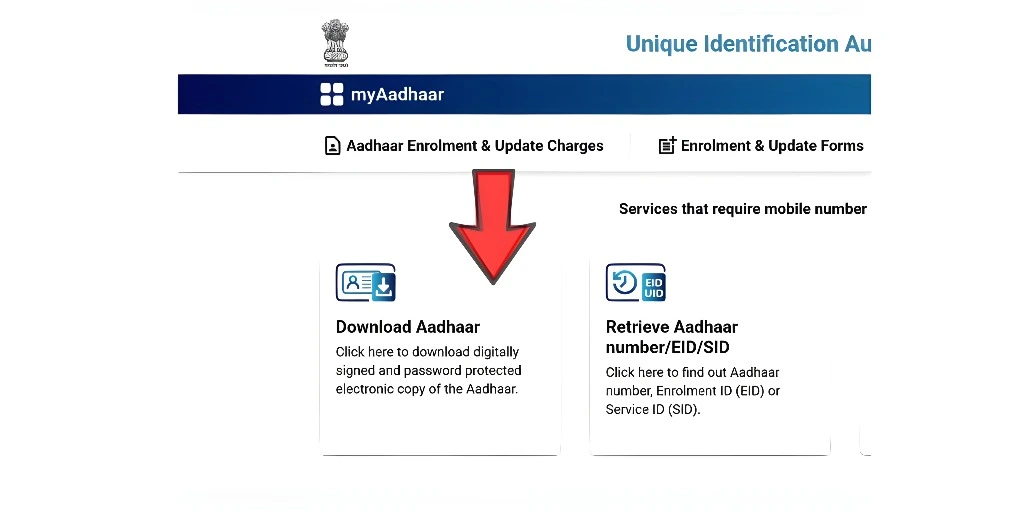
  • Under the “My Aadhaar” section, select Download Aadhaar.
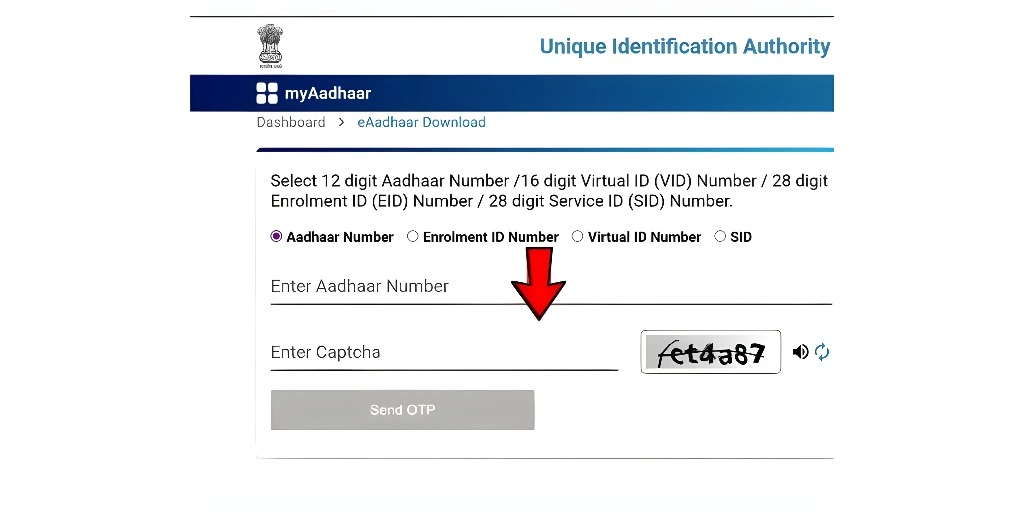
  • Choose an identifier: Aadhaar number, Enrollment ID (EID), or Virtual ID (VID).
  • Enter the CAPTCHA and click Send OTP.
  • Select either Regular Aadhaar or Masked Aadhaar.
  • Enter the OTP received and click Verify & Download.
  • Open the downloaded PDF using a PDF reader and enter the password (first four letters of your name in uppercase + year of birth).
Aadhaar Download 2026 – Fast & Secure Easy Guide Now Free!

2. mAadhaar App

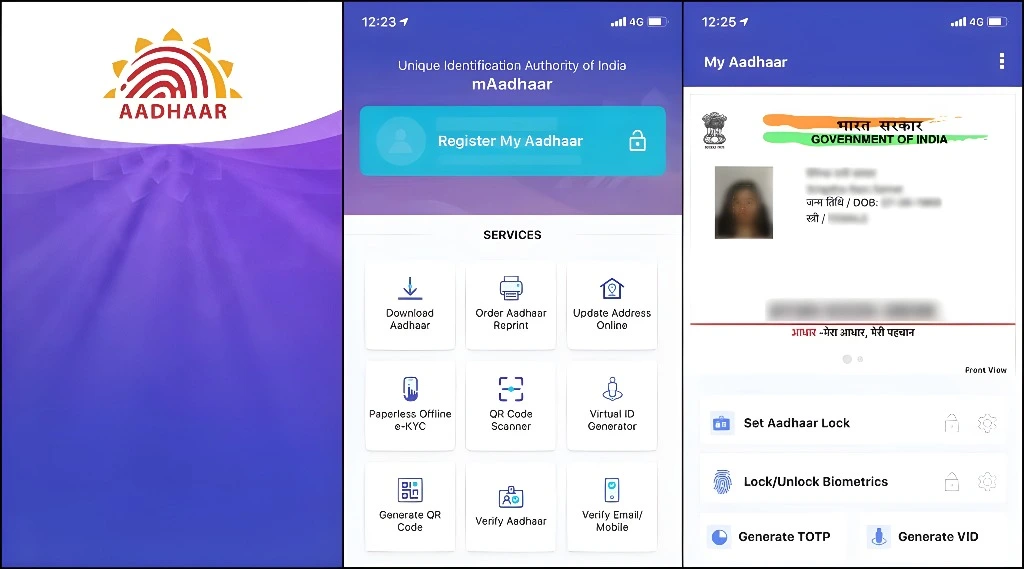
The mAadhaar app allows you to manage and download Aadhaar securely on your smartphone.
  • Steps:
  • Download the mAadhaar app from Google Play Store or App Store.
  • Log in using your registered mobile number and verify via OTP.
  • Go to the dashboard and select Download Aadhaar.
  • Enter your Aadhaar number, EID, or VID and click Request OTP.
  • After verification, click Verify & Download to save the PDF.
Aadhaar Download 2026 – Fast & Secure Easy Guide Now Free!

3. DigiLocker

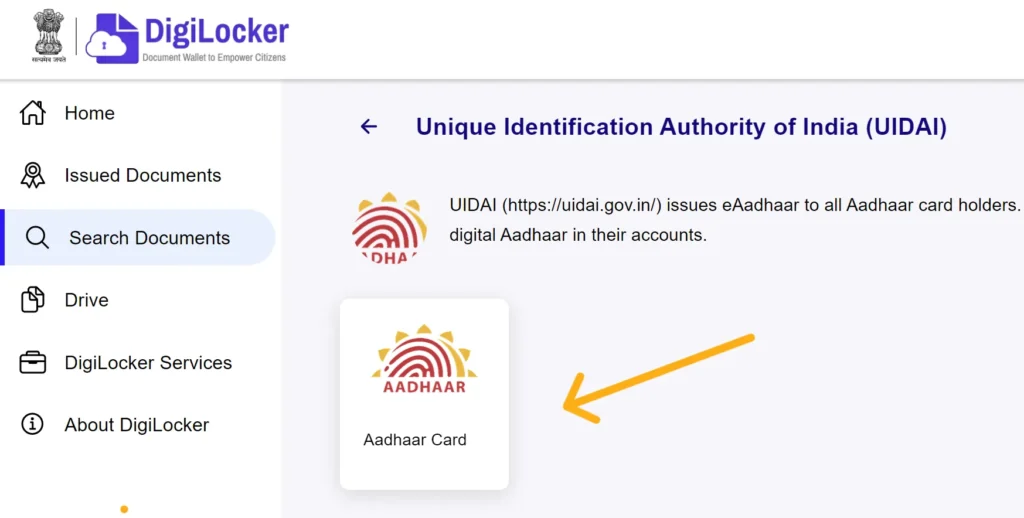
DigiLocker is a government cloud platform where you can securely store and access Aadhaar and other official documents.

Aadhaar Download 2026 – Fast & Secure Easy Guide Now Free!
  • Steps:
  • Visit DigiLocker or download the app.
  • Log in using your mobile number, Aadhaar number, or username.
  • Search for “UIDAI” and select Aadhaar.
  • Enter your Aadhaar number and verify via OTP.
  • Click the download icon to save the PDF.
Aadhaar Download 2026 – Fast & Secure Easy Guide Now Free!

4. WhatsApp DigiLocker (MyGov Helpdesk)

A simple and quick method to Aadhaar download via WhatsApp, using the MyGov Helpdesk chatbot.

  • Steps:
  • Save +91 90131 51515 in your contacts and send “Hi” on WhatsApp.
  • Choose DigiLocker services and follow the prompts to link your Aadhaar.
  • Enter OTP and select Aadhaar from the list.
  • The e-Aadhaar PDF will be sent to you in WhatsApp.

5. Without Registered Mobile Number

If your mobile number is not linked with your Aadhaar, visit an Aadhaar Seva Kendra (ASK) for biometric verification.

  • Steps:
  • Visit an Aadhaar Seva Kendra (ASK) with valid ID proof.
  • Provide biometric data (fingerprint/iris scan) for identity verification.
  • Request a printout of your Aadhaar card (₹30 for color print, ₹50 for PVC).

6. Retrieve Aadhaar Using Name and Date of Birth

If you have forgotten your Aadhaar number or EID, you can retrieve it using your name and date of birth.

  • Steps:
  • Go to the UIDAI portal and select Retrieve EID/Aadhaar Number.
  • Enter your full name, mobile number/email, and date of birth.
  • Complete CAPTCHA and click Send OTP.
  • After verification, you will receive your Aadhaar or EID on your mobile/email.
  • Follow the steps to download your e-Aadhaar.

Password Format for e-Aadhaar

To open your downloaded e-Aadhaar PDF, use the following password format:

  • Password = First four letters of your name (CAPITAL) + year of birth (YYYY).
  • Example: For “Radhika Sharma, born in 1990,” the password would be RADI1990.

Masked Aadhaar

For enhanced privacy, you can download a Masked Aadhaar, which hides the first eight digits of your Aadhaar number. While checking your Aadhaar Card Status or completing KYC (Know Your Customer) verification, rental agreements, and job applications, this option is ideal when you do not need to share your full Aadhaar number.

  • Steps to Download Masked Aadhaar:
  • Visit the UIDAI website and select Download Aadhaar.
  • Choose the Masked Aadhaar option.
  • Follow the steps to verify OTP and download the PDF.

Troubleshooting Common Issues

  • OTP Not Received: Ensure your mobile signal is stable or use the TOTP feature from the mAadhaar app.
  • Invalid EID/UID: Make sure you are entering the correct 12-digit Aadhaar number or 28-digit EID.
  • Password Issues: Ensure you are using the correct format: first four letters of your name in uppercase + birth year.
  • Mobile Not Linked: Visit the nearest Aadhaar Seva Kendra to link your mobile number.

Why do I sometimes not receive OTP even though the mobile number is linked?

This is a common issue faced by Aadhaar users. There could be multiple reasons:

  • Network Issues: If you are in an area with poor network coverage, OTPs might not be delivered. Try switching to a better network or using Wi-Fi if possible.
  • Service Provider Delays: Some network providers experience delays in sending OTPs, especially during peak hours.
  • DND (Do Not Disturb): If your mobile number is registered for DND services, it might block OTP messages. Ensure that you’ve opted out of DND.
  • Old or Inactive Mobile Number: If your mobile number has become inactive or has been changed without updating UIDAI, the OTP might fail.

Solution: Try using TOTP (Time-based One-Time Password) from the mAadhaar app as an alternative method to get OTP verification without relying on SMS.

Can I download Aadhaar if my mobile number is inactive or lost?

Yes, if your mobile number is not linked or is lost, you can still download your Aadhaar, but you’ll need to follow an offline process:

  • Aadhaar Seva Kendra (ASK): Visit your nearest Aadhaar Seva Kendra where you can provide biometric verification (fingerprint or iris scan). The staff will help you download your Aadhaar for a small fee.
  • Biometric Authentication: You’ll need to provide biometric authentication for identity verification before Aadhaar is downloaded.

Solution: Make sure to update your mobile number at the Seva Kendra to enable future online downloads with OTP.

What should I do if the OTP arrives but fails to verify on the UIDAI website?

This can happen for several reasons:

  • OTP Expired: OTPs are valid only for a limited time (usually 10 minutes). If it expires, you’ll need to request a new OTP.
  • Incorrect Input: Ensure that you are entering the OTP correctly. The OTP is case-sensitive and must be typed exactly as received.
  • Multiple Attempts: If you have entered multiple incorrect OTPs, your request might be temporarily blocked for security reasons.

Solution: Wait for a few minutes, refresh the page, and request a new OTP. If the issue persists, try accessing the site after some time.

Why does my e-Aadhaar PDF not open even when I use the correct password?

If the e-Aadhaar PDF is not opening:

  • Wrong Password Format: Make sure you are using the correct format. The password is the first four letters of your name in uppercase followed by your birth year (e.g., PRIY1990).
  • Corrupted File: Sometimes, the PDF can get corrupted during the download process due to network instability.
  • Outdated PDF Reader: An outdated version of Adobe Reader or other PDF readers might not open the file.

Solution: Try opening the PDF with a different PDF reader or update your current reader. If the issue persists, re-download the Aadhaar card and ensure a stable internet connection.

How can I download Aadhaar on a phone without internet or very slow internet?

If you are in an area with no internet access or have slow connectivity:

  • Offline Download from Aadhaar Seva Kendra: You can visit an Aadhaar Seva Kendra to download and print your Aadhaar. This method doesn’t require internet access.
  • Using TOTP: If you are on a weak connection, use the mAadhaar app’s TOTP feature (Time-based OTP) to get verification without waiting for an SMS OTP.

Solution: If no internet is available, offline download is the best option. If you have limited connectivity, use TOTP through the mAadhaar app for smoother verification.

Can I download someone else’s Aadhaar with their permission?

It is legally permissible to download someone else’s Aadhaar card if you have their Aadhaar Number, Enrolment ID (EID), or Virtual ID (VID). However:

  • Consent: Make sure you have explicit consent from the person to download their Aadhaar for privacy and legal reasons.
  • OTP Verification: OTP will be sent to the registered mobile number of the Aadhaar holder, so you must have access to that number to complete the download.

Solution: Ensure that you have their registered mobile number to receive OTP. If the person is unable to receive OTP, you will need to visit an Aadhaar Seva Kendra together.

What is the safest way to share my e-Aadhaar with others without exposing the full Aadhaar number?

To protect your privacy:

  • Masked Aadhaar: Always prefer to share a Masked Aadhaar when possible. This will show only the last four digits of the Aadhaar number.
  • Secure Sharing: Use encrypted platforms like DigiLocker or mAadhaar app for sharing. Avoid sending Aadhaar through email or unencrypted messaging platforms.

Solution: For extra security, share the Masked Aadhaar version, especially when submitting Aadhaar for KYC or other verification processes.

Why does UIDAI sometimes reject my EID or VID as invalid even though it is correct?

Several factors can cause this:

  • Incorrect Input: Ensure that you are entering the full EID or VID without any extra spaces or characters.
  • Expired EID: If your Aadhaar enrollment process was a long time ago, the EID might have expired or been deactivated.
  • UIDAI System Glitch: Occasionally, UIDAI’s systems may have temporary issues that cause valid EIDs and VIDs to be marked as invalid.

Solution: Double-check the numbers entered and ensure that they are correct. If the issue persists, try retrieving your Aadhaar details through the Retrieve EID/Aadhaar Number option on the UIDAI website.

Does e-Aadhaar expire or need updating after any changes?

No, e-Aadhaar does not expire. However:

  • Changes in Personal Details: If you make updates (e.g., changing your address, mobile number, or other personal information), your downloaded e-Aadhaar will not reflect these changes until you download it again from the UIDAI portal.
  • Frequent Updates: If your Aadhaar details change regularly (such as after marriage or moving to a new address), it’s a good practice to download your updated e-Aadhaar frequently to ensure it’s up to date.

Solution: After any personal update or change, visit the UIDAI portal to download the latest version of your e-Aadhaar to reflect the updated information.

What are the reasons Aadhaar download might fail multiple times in a row?

Possible reasons for repeated download failures include:

  • Incorrect Details: Double-check your entered Aadhaar number, EID, or VID, ensuring that there are no typos.
  • OTP Issues: If OTP is delayed or not received due to network problems, it can prevent the download.
  • Corrupted PDF: A broken or incomplete PDF file during download can lead to failures in opening.
  • UIDAI Server Overload: During peak times, UIDAI’s servers may experience heavy traffic, causing temporary failures.

Solution: If the issue persists, retry after a few minutes, ensure your OTP is valid, and use a stable internet connection.

FAQs

You can download your Aadhaar card online through the official UIDAI portal, mAadhaar app, DigiLocker, or WhatsApp DigiLocker service. These methods require an OTP for verification.

The password is a combination of the first four letters of your name in uppercase followed by your birth year (e.g., RAHU1990).

No, you cannot Aadhaar download online without a registered mobile number. In such cases, you need to visit an Aadhaar Seva Kendra for assistance.

Yes, you can download your e-Aadhaar as many times as required from the UIDAI website using your Aadhaar number, EID, or VID.

Regular Aadhaar displays the full 12-digit Aadhaar number, while Masked Aadhaar shows only the last four digits for enhanced privacy protection.

Yes, as per the Aadhaar Act of 2016, e-Aadhaar is legally valid and accepted as proof of identity and address across India for all government and private services.

If the password doesn’t work, check that you are using the correct format (first four letters of your name in uppercase + birth year). Ensure your name and birth year are correct as per your Aadhaar record.

Yes, if you have forgotten your Aadhaar number, you can retrieve it using your name, date of birth, and registered mobile number/email, and then proceed to download your e-Aadhaar.

It’s always recommended to download Aadhaar from official websites only, such as UIDAI or DigiLocker, to avoid scams and ensure security.

Yes, you can print your e-Aadhaar using any printer after downloading the PDF. The printed version is legally valid and can be used as proof of identity.

Final Thoughts

Aadhaar download has never been easier. Whether you prefer using the official UIDAI website, the mAadhaar app, DigiLocker, or even WhatsApp, you can now access your Aadhaar anytime and from anywhere, securely and efficiently. If you’re facing any issues, make sure to use the official channels for assistance, or visit an Aadhaar Seva Kendra for offline support. Make the most of these digital solutions, and always ensure your Aadhaar is stored securely.